I recently had a use-case where I could finally tinker with Gateway API, a new interface for handling service traffic in Kubernetes. You can think of it as a successor to the current Ingress APIs.
Gateway API is built and maintained by the Kubernetes Network Special Interest Group.
Gateway API is essentially just an API, it is a set of CRDs that you install in your cluster and does not come with a controller of any kind. A separate Gateway Controller has to be installed for things to work, there are many implementations to choose from but some examples include Envoy Gateway, Traefik Proxy, Cilium and Istio.
In this post I will focus on Envoy Gateway but the general concepts should stay the same for other implementations.
When explaining Gateway API it can be useful to have the illustration below in the back of your mind.
Feel free to use it as a reference as you read on.
Gateway API illustration from the official documentation
If you are familiar with Ingress in Kubernetes, think of Gateway API like this:
Ingress API
Gateway API
IngressClass
GatewayClass
IngressController
Gateway
Ingress
HTTPRoute, TLSRoute, TCPRoute
Let us go through the most important resources one by one.
A common scenario is when you want to provide developers with a way of exposing applications publicly on the internet, but also the ability to expose them on an internal private network.
In this case you would typically create two GatewayClasses like this:
The next resource it the Gateway itself. In OpenShift this is equivalent to the IngressController resource but for other Ingress providers there is usually not a separate resource for this.
The Gateway is responsible for configuring the infrastructure so that network traffic in some way (up to the implementation) can reach the cluster, for example with a LoadBalancer service, in addition to the software that routes this traffic (typically a reverse proxy of some sort).
In the case of Envoy Gateway, an Envoy proxy is started and is what does the actual proxying and loadbalancing.
Below is a simple example of a Gateway with a single http listener:
We can also add more listeners if we want to, here is an example with listeners for https (terminated in the gateway) and passthrough tls.
Hostname matchers are added to control what listener an httproute is attached to.
apiVersion:gateway.networking.k8s.io/v1kind:Gatewaymetadata:name:egspec:gatewayClassName:eginfrastructure:parametersRef:group:gateway.envoyproxy.iokind:EnvoyProxyname:proxy-configlisteners:- name:httpprotocol:HTTPport:80hostname:"www.example.com"- name:httpsprotocol:HTTPSport:443hostname:"*.example.com"tls:mode:TerminatecertificateRefs:# assume this contains a wildcard certificate for *.example.com- kind:Secretname:eg-https- name:tlsport:6443protocol:TLStls:mode:Passthrough
In this case an httproute with www.example.com as the hostname would match the HTTP listener, while httproutes with hostnames like foo.example.com or bar.example.com would match the HTTPS listener.
This can of course be tweaked and modified further and you can read more about it in the HTTPRouteSpec mentioned below.
The tls listener can only be used by a TLSRoute.
By default a Gateway can only be used by routes in the same namespace, this can be modified with the allowedRoutes field on each listener.
If we want to make a listener available in all namespaces we can do it like this:
If we wanted to use the tls passthrough listener in the Gateway above, we would need to create a TLSRoute which is available in the Experimental Channel of Gateway API.
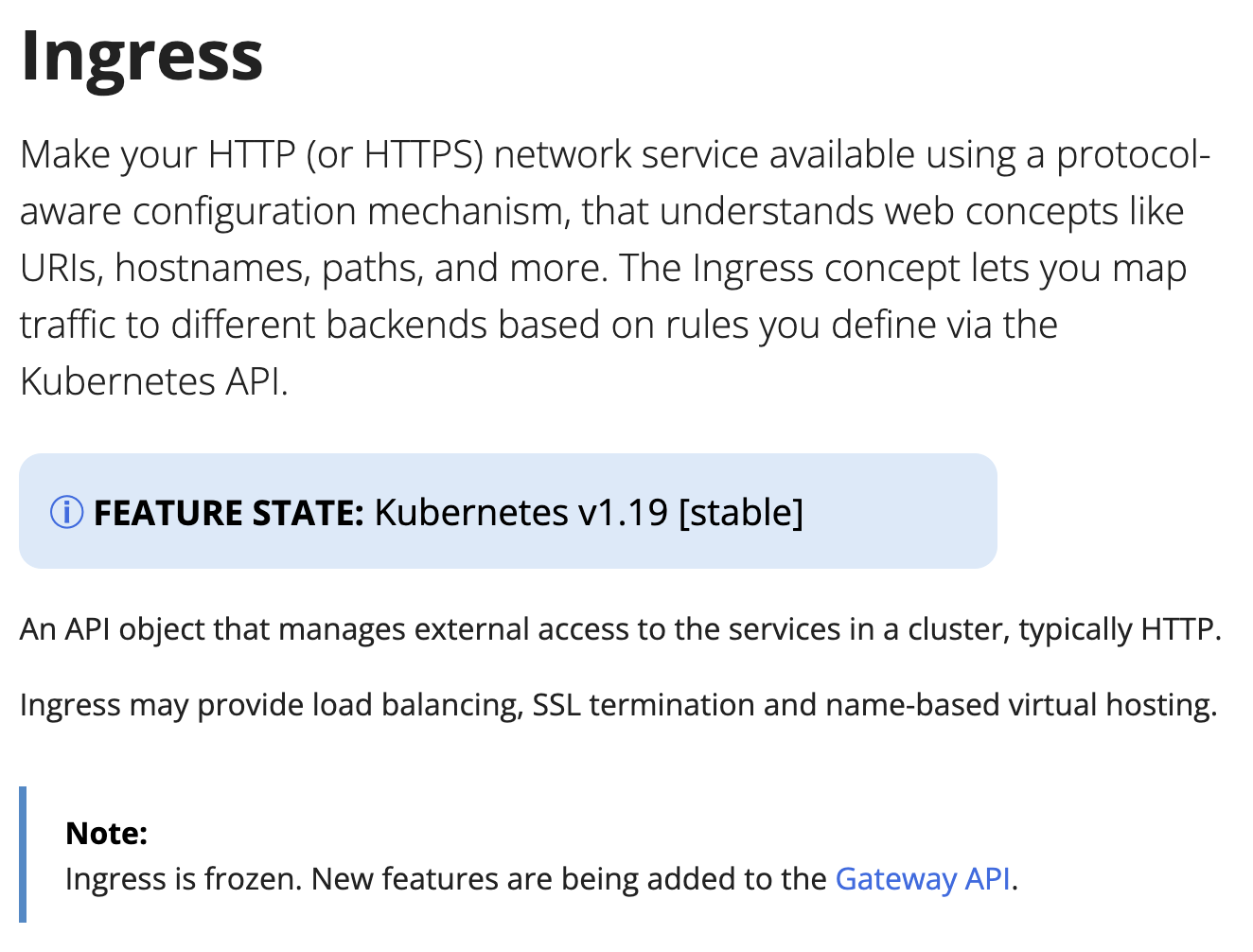
You might be asking, why do we need Gateway API when we already have Ingress?
First of all, development on Kubernetes Ingress is frozen, which means that any new features will be added to Gateway API from now on.
This also means that most of the big providers have transitioned their implementation to use Gateway API.
Second, the current implementation of Ingress in Kubernetes is very bare-bones and lacks extensibility, which has resulted in a big sprawl between the different implementations on how things are done.
With Gateway API everyone is using the same standardized specification, while still allowing for extending functionality with implementation-specific resources.
There are several other benefits of using Gateway API over Ingress, one of the most obvious improvements is with configuration and customization.
With Ingress, this is usually handled with annotations on the Ingress resource and you could in a worst case scenario end up with something like this:
apiVersion:gateway.networking.k8s.io/v1kind:HTTPRoutemetadata:name:appspec:parentRefs:- name:edgehostnames:- app.example.comrules:- backendRefs:- name:app-svcport:80---# SecurityPolicy: CORS + IP allowlist (replaces the Ingress annotations above)apiVersion:gateway.envoyproxy.io/v1alpha1kind:SecurityPolicymetadata:name:app-securityspec:targetRefs:- group:gateway.networking.k8s.iokind:HTTPRoutename:appcors:allowOrigins:["https://example.com"]allowMethods:["GET","POST","PUT","DELETE","OPTIONS"]allowHeaders:["Authorization","Content-Type"]exposeHeaders:["X-Request-Id"]allowCredentials:truemaxAge:86400authorization:defaultAction:Denyrules:- action:Allowprincipal:clientCIDRs:- 10.0.0.0/8- 192.168.0.0/16
The HTTPRoute itself stays tidy and any extra customization can be offloaded to a SecurityPolicy, HTTPRouteFilter, BackendTrafficPolicy or ClientTrafficPolicy resource.
By utilizing spec.targetRefs, this SecurityPolicy resource for example can be used per HTTPRoute or enforced for all routes on a specific Gateway.
Note
SecurityPolicy is specific to Envoy Gateway, but other implementations should have similar ways of configuring these types of settings.
When using Gateway API you can really tell that is a modern Kubernetes API with a lot of thought put into it. This is especially true when it comes to the statuses and conditions for all the resources.
Just by looking at the status of a resource you can quickly tell if everything is working or if there is something wrong with the configuration and why.
Many Kubernetes APIs are unfortunately not great at this, so it is very refreshing to see it done well and it is a joy to work with.
Examples from HTTPRoute and Gateway:
HTTPRoute
1
2
3
4
5
6
7
8
9
10
11
12
status:parents:- conditions:- message:Route is acceptedreason:Acceptedstatus:"True"type:AcceptedcontrollerName:gateway.envoyproxy.io/gatewayclass-controllerparentRef:group:gateway.networking.k8s.iokind:Gatewayname:eg
status:addresses:- type:IPAddressvalue:172.18.0.3conditions:- message:The Gateway has been scheduled by Envoy Gatewayreason:Acceptedstatus:"True"type:Accepted- message:Address assigned to the Gateway, 1/1 envoy replicas availablereason:Programmedstatus:"True"type:Programmedlisteners:- attachedRoutes:1conditions:- message:Sending translated listener configuration to the data planereason:Programmedstatus:"True"type:Programmed- message:Listener has been successfully translatedreason:Acceptedstatus:"True"type:Acceptedname:httpsupportedKinds:- group:gateway.networking.k8s.iokind:HTTPRoute
It is also very noticeable when working with all the different resources. Every field of every CRD is extremely well documented and has great validation as well,
Just take a look at the documentation for the .spec.hostnames field in the HTTPRoute resource as an example:
// HTTPRouteSpec defines the desired state of HTTPRoutetypeHTTPRouteSpecstruct{// Hostnames defines a set of hostnames that should match against the HTTP Host// header to select a HTTPRoute used to process the request. Implementations// MUST ignore any port value specified in the HTTP Host header while// performing a match and (absent of any applicable header modification// configuration) MUST forward this header unmodified to the backend.//
// Valid values for Hostnames are determined by RFC 1123 definition of a// hostname with 2 notable exceptions://
// 1. IPs are not allowed.// 2. A hostname may be prefixed with a wildcard label (`*.`). The wildcard// label must appear by itself as the first label.//
// If a hostname is specified by both the Listener and HTTPRoute, there// must be at least one intersecting hostname for the HTTPRoute to be// attached to the Listener. For example://
// * A Listener with `test.example.com` as the hostname matches HTTPRoutes// that have either not specified any hostnames, or have specified at// least one of `test.example.com` or `*.example.com`.// * A Listener with `*.example.com` as the hostname matches HTTPRoutes// that have either not specified any hostnames or have specified at least// one hostname that matches the Listener hostname. For example,// `*.example.com`, `test.example.com`, and `foo.test.example.com` would// all match. On the other hand, `example.com` and `test.example.net` would// not match.//
// Hostnames that are prefixed with a wildcard label (`*.`) are interpreted// as a suffix match. That means that a match for `*.example.com` would match// both `test.example.com`, and `foo.test.example.com`, but not `example.com`.//
// If both the Listener and HTTPRoute have specified hostnames, any// HTTPRoute hostnames that do not match the Listener hostname MUST be// ignored. For example, if a Listener specified `*.example.com`, and the// HTTPRoute specified `test.example.com` and `test.example.net`,// `test.example.net` must not be considered for a match.//
// If both the Listener and HTTPRoute have specified hostnames, and none// match with the criteria above, then the HTTPRoute is not accepted. The// implementation must raise an 'Accepted' Condition with a status of// `False` in the corresponding RouteParentStatus.//
// In the event that multiple HTTPRoutes specify intersecting hostnames (e.g.// overlapping wildcard matching and exact matching hostnames), precedence must// be given to rules from the HTTPRoute with the largest number of://
// * Characters in a matching non-wildcard hostname.// * Characters in a matching hostname.//
// If ties exist across multiple Routes, the matching precedence rules for// HTTPRouteMatches takes over.//
// Support: Core//
// +optional// +kubebuilder:validation:MaxItems=16Hostnames[]Hostname`json:"hostnames,omitempty"`}
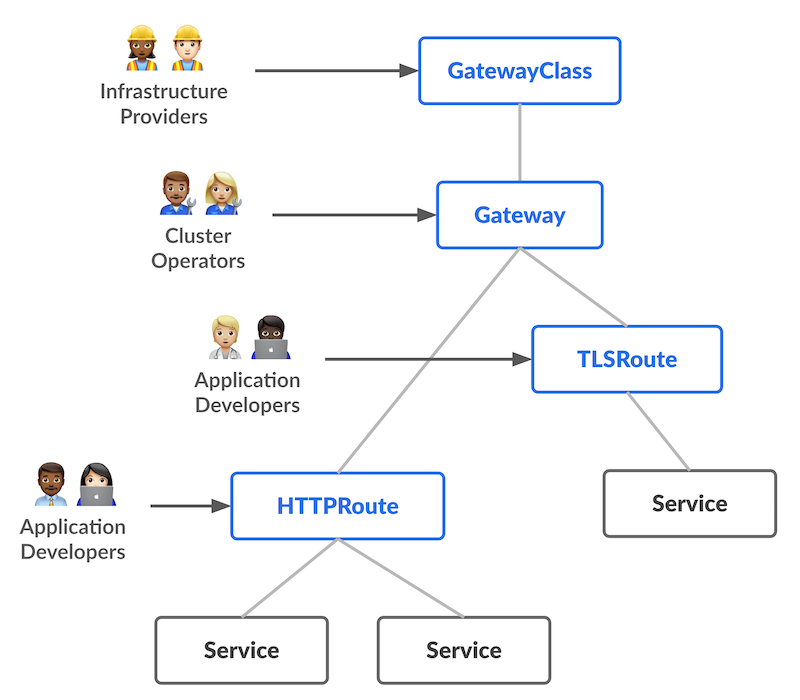 Gateway API illustration from the official documentation